SOLUTIONS
Have questions?
Let’s chat and find the perfect solution for your property.Have questions?
Let’s chat and find the perfect solution for your property.VERTICALS
HOTELIER RESOURCES
INNsight PMS
Manage all reservations in one place and optimize revenue with our intuitive tools.
REQUEST A DEMOWe understand managing reservations through multiple OTA platforms and updating inventories can be extremely tiring. INNsight’s Property Management Software simplifies this through easy OTA connections, bringing all your bookings and inventory updates into one central hub.
You contact us for OTA Channel Integration.
You sit back, and the INNsight Team will take care of the rest.
Once OTAs are integrated, you can choose how many rooms you want to make available for sale on which OTA and at what price.
Our PMS will dynamically update the information once you start getting OTA bookings.
When a booking is made on an OTA, your room inventory is instantly updated in the PMS. This ensures accurate availability across all channels and helps prevent double bookings.
Comprehensive View of Your OTA Bookings
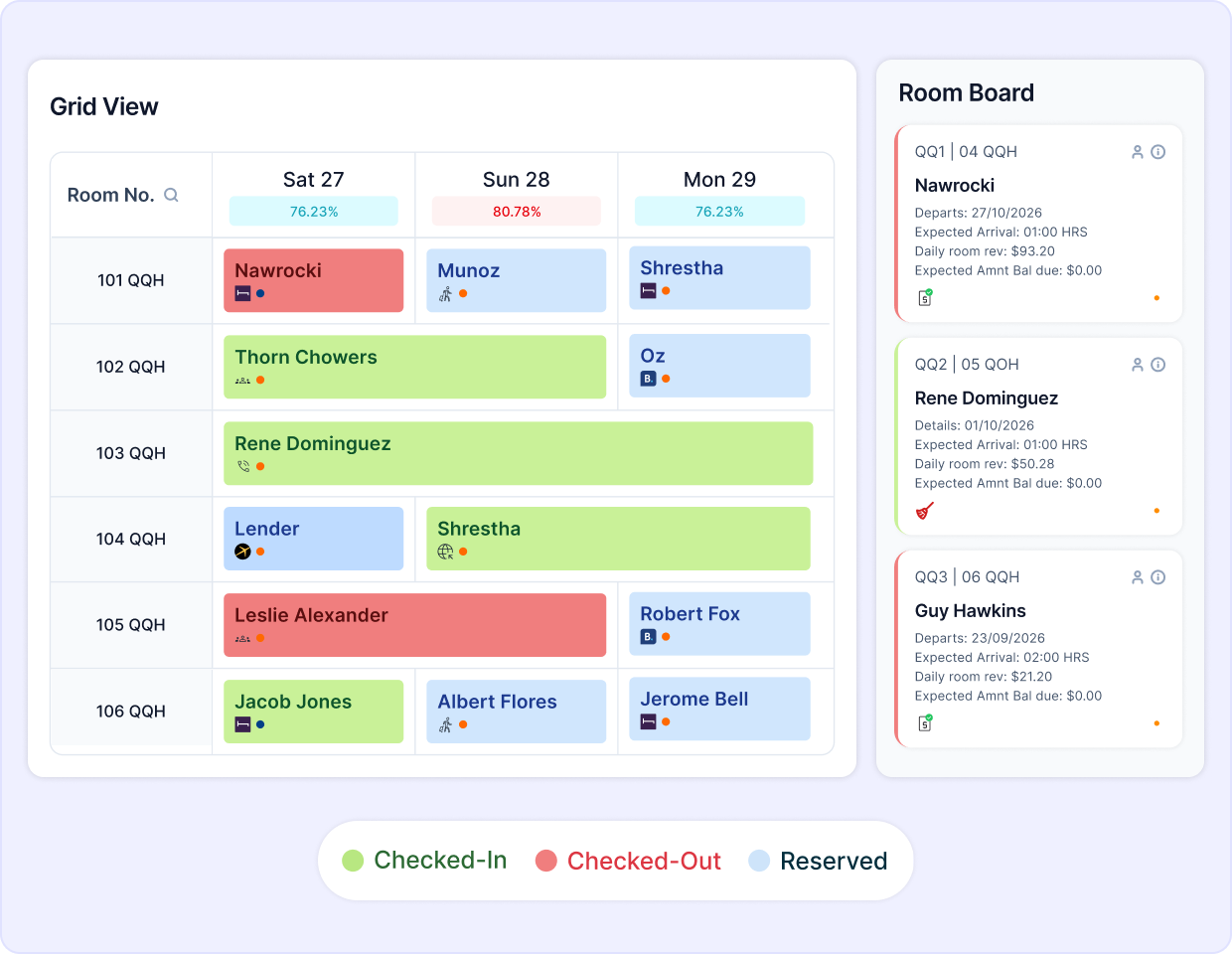
Get a comprehensive view of all your bookings, including OTA bookings. See the source of the booking, payment details, guest name, room number, check-in/check-out dates, and more.
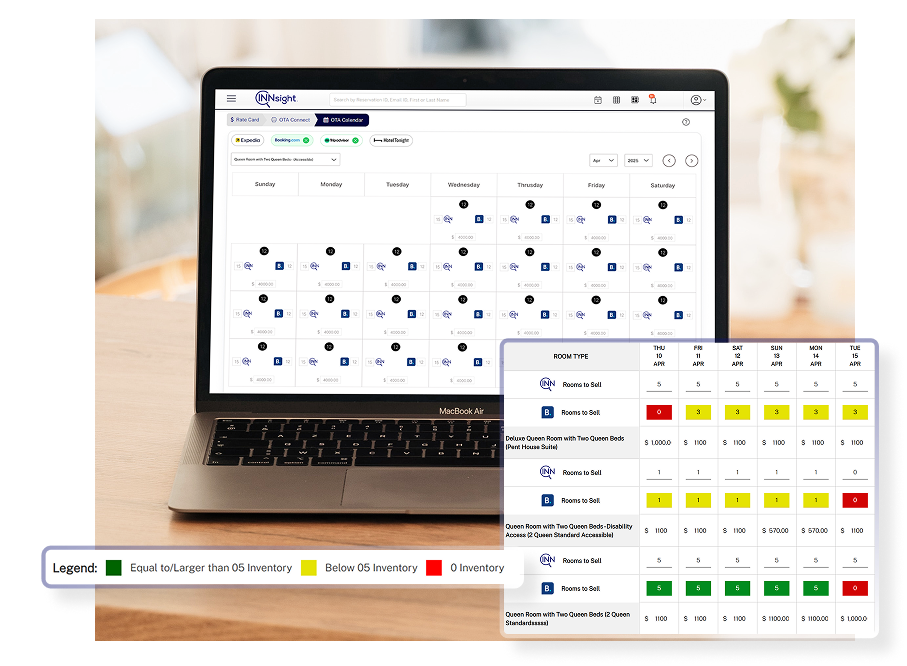
View all your OTA bookings in a dedicated OTA calendar. Get a quick understanding of room availability on each OTA on any given day. Directly update room rates for specific days & room types while selecting how you want to display reservation & payment details.
A more comprehensive, color-coded view of your room inventory across all connected OTAs. Quickly check room availability with rates. The room inventory is color-coded for your convenience.
Smarter OTA syncing built for control, clarity, and conversions.
Comprehensive Overview with Clear Color-Coding:
You can view OTA bookings in the regular calendar, a dedicated OTA calendar, and in the Reservations list with clear color coding for easy understanding.
Easy Integrations with Minimal Disruptions:
Our talented team takes care of the OTA integrations, taking the stress off your shoulders.
Detailed Reporting for Data-Driven Decision Making:
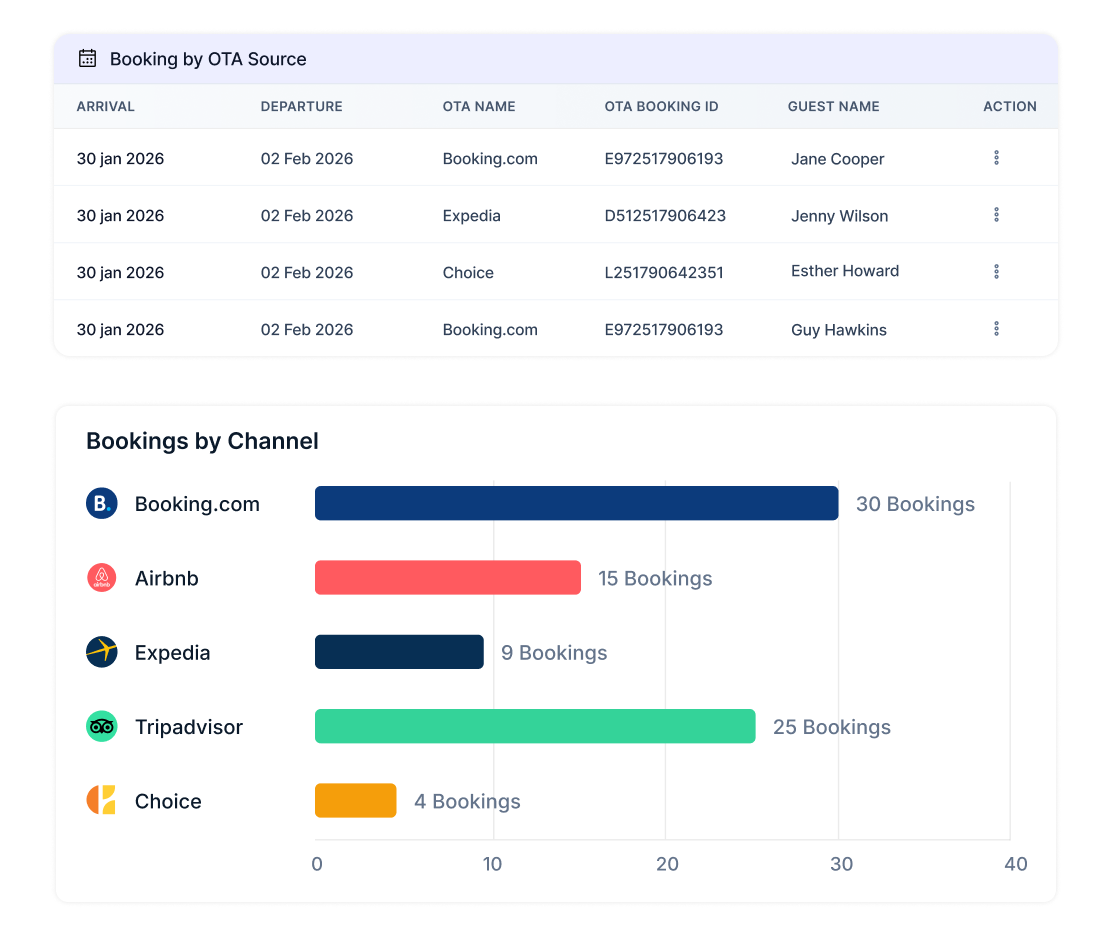
Get a performance report and understand how you are doing on all the OTAs, along with direct bookings.
Central Reservation System for all Connected OTAs:
Manage all the bookings from OTAs from one centralized location seamlessly.
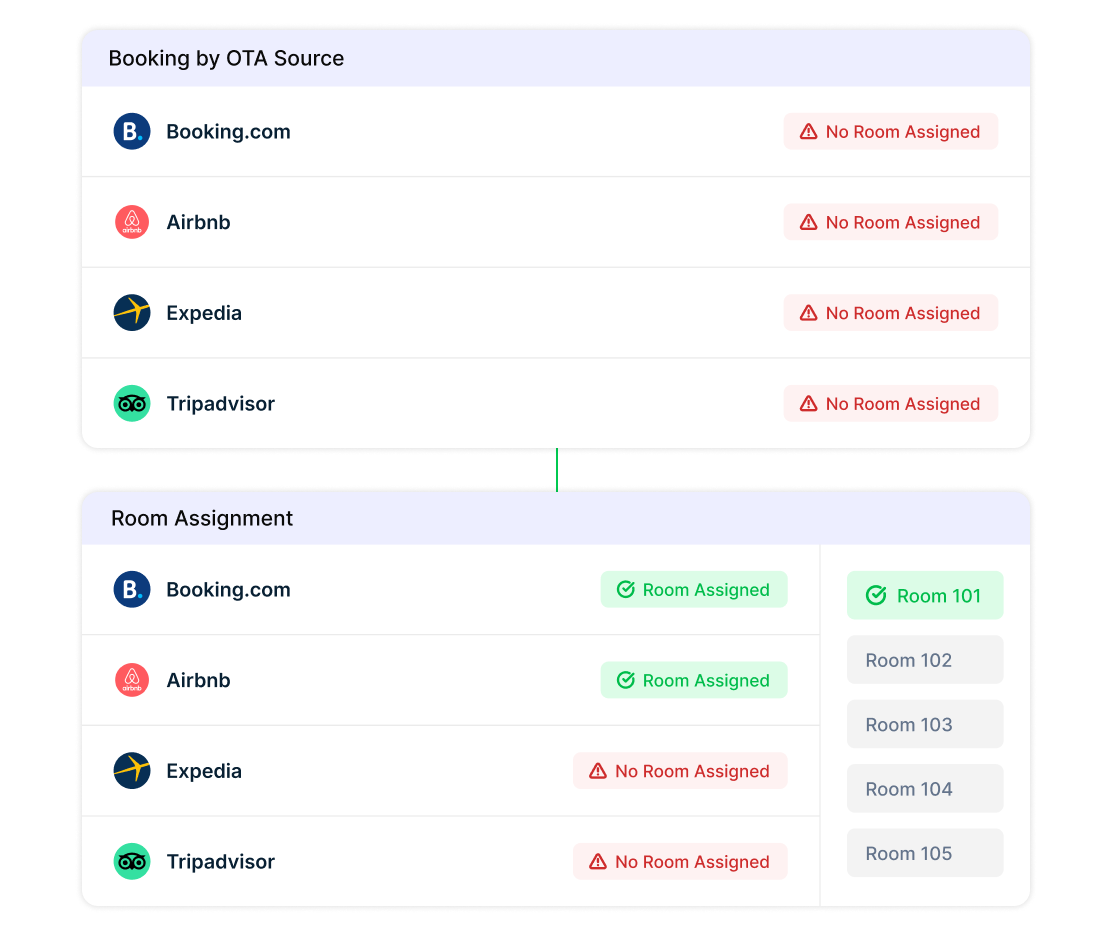
Dedicated Unallocated OTA Bookings List:
View all the unallocated room bookings from the OTAs.
Dynamic Pricing & Revenue Management:
Update the room rates and OTA inventory in the PMS, and it will be dynamically updated on the OTAs, eliminating human errors.
Reconciliation of OTA Lost Revenue:
Avoid lost revenue on OTAs due to any rooming conflicts and manually assign suitable rooms.
Avoid Overbooking:
Out instant and automated sync with the OTAs avoids overbookings and lost revenue.
Track Your Performance with
Powerful Reporting
Track your OTA performance with detailed reports. Gain valuable insights into your booking trends and make data-driven decisions to maximize your revenue.
Manage Unallocated
OTA Bookings with Ease
Don't worry about the lost revenue in the rooming conflict situation. All the unallocated OTA bookings are displayed in the Unallocated OTA Bookings List. Easily assign suitable rooms to the reservations manually from here.
Manage Unallocated OTA Bookings with Ease
Request a DemoBy submitting your email address, you confirm that you would like to receive marketing emails from INNsight. In addition, you agree to the storing and processing your data by INNsight as described in our privacy policy.
This website uses cookies to deliver our services and to show you relevant inventory, property details, and rates for . By using our website, you acknowledge that you have read and understand our Cookie Policy, Privacy Policy, and our Terms of Service. Your use of 's services, including the booking of online reservations, is subject to these policies and terms.
These Cookies are strictly necessary to provide you with services available through our websites and to use some of its features, such as access to secure areas and to book accommodations.
Cookie Name: Apache
Description: Logging Visitor IP for legal / operational purposes
Party: First-party (INNsight)
Expiration: Session
Data Type: Session Identifier
Cookie Name: PHPSESSID
Description: Session data (login/application state)
Party: First-party (INNsight)
Expiration: Session
Data Type: Session Identifier
These Cookies are used to enhance the performance and functionality of our websites but are non-essential to their use. However, without these Cookies, certain functionality (like videos) may become unavailable.
These Cookies collect information that is used either in aggregate form to help us understand how our websites are being used or how effective our marketing campaigns are, or to help us customize our websites for you.
Cookie Name: _ga
Description: Google Analytics website stats
Party: Third-party (Google Analytics)
Expiration: Not specified
Data Type: Analytics identifier
Cookie Name: _gid
Description: Session data (login/application state)
Party: First-party (INNsight)
Expiration: Session
Data Type: Analytics identifier
Cookie Name: gat_gtag_[ID]
Description: Google Analytics tracking events
Party: Third-party (Google Analytics)
Expiration: Not specified
Data Type: Tracking identifier
Cookie Name: __utma / __utmb / __utmc / __utmt / __utmz
Description: Google Analytics legacy tracking
Party: Third-party (Google Analytics)
Expiration: Not specified
Data Type: Analytics tracking data
Cookie Name: _ga / _gid / gid / apnid / cid / _dc_gtm_[ID] / dc-adv / tapid / optimizelySegments / optimizelyBuckets / optimizelyEndUserId / _mkto_trk
Description: Sojern advertising/remarketing
Party: Sojern advertising/remarketing
Expiration: Not specified
Data Type: Advertising identifiers
Cookie Name: anj / uuid2
Description: AppNexus ad targeting cookies
Party: Third-party (AppNexus)
Expiration: Not specified
Data Type: Advertising identifiers

These Cookies are used to make advertising messages more relevant to you. They perform functions like preventing the same ad from continuously reappearing, ensuring that ads are properly displayed for advertisers, and in some cases selecting advertisements that are based on your interests.
Cookie Name: IDE / DSID / 1P_JAR
Description: Google DoubleClick advertising
Party:Third-party (Google/DoubleClick)
Expiration: Not specified
Data Type: Advertising identifiers
Cookie Name: __sonar
Description: DoubleClick advertising/targeting
Party:Third-party (Google/DoubleClick)
Expiration: Not specified
Data Type: Advertising data
These Cookies are used to enable you to share pages and content that you find interesting on our websites through third-party social networking and other websites. These Cookies may also be used for advertising purposes, too.
Cookie Name: loc / mus / na_tc / ouid / uid / uvc / __atuvc / __atuvs / km_ai / km_lv / km_vs / kvcd / _gid
Description: AddThis social sharing cookies
Party:Third-party (AddThis)
Expiration: Not specified
Data Type: Sharing/usage identifiers

Cookie Name: __sharethis_cookie_test__ / __unam
Description:ShareThis sharing/tracking
Party:Third-party (ShareThis)
Expiration: Not specified
Data Type: Share tracking IDs
What Are Cookies?
Cookies are small data files that are placed on your computer or mobile device when you visit a website. Cookies are widely used by website owners in order to make their websites work, or to work more efficiently, as well as to provide reporting information.

Cookies set by the website owner are called “first party cookies.” cookies set by parties other than the website owner are called “third party cookies.” Third party Cookies enable third party features or functionality to be provided on or through the website (e.g. like advertising, interactive content, analytics, etc….). The parties that set these third party Cookies can recognize your computer both when it visits the website in question and also when it visits certain other websites.
Why Do We Use Cookies?
We use first and third party Cookies for several reasons. Some Cookies are required for technical reasons in order for our websites to operate, and we refer to these as “strictly essential” or "strictly necessary” Cookies. Other Cookies also enable us to track and target the interests of our users to enhance the experience on our website. Third parties serve Cookies through our website for advertising, analytics, and other purposes.
The law states that we can store cookies on your device without prior consent for strictly essential or strictly necessary cookies. For all other types of cookies we need your permission. You can at any time accept, reject, or change the cookie settings on this website at any time by clicking on the cookie settings link.